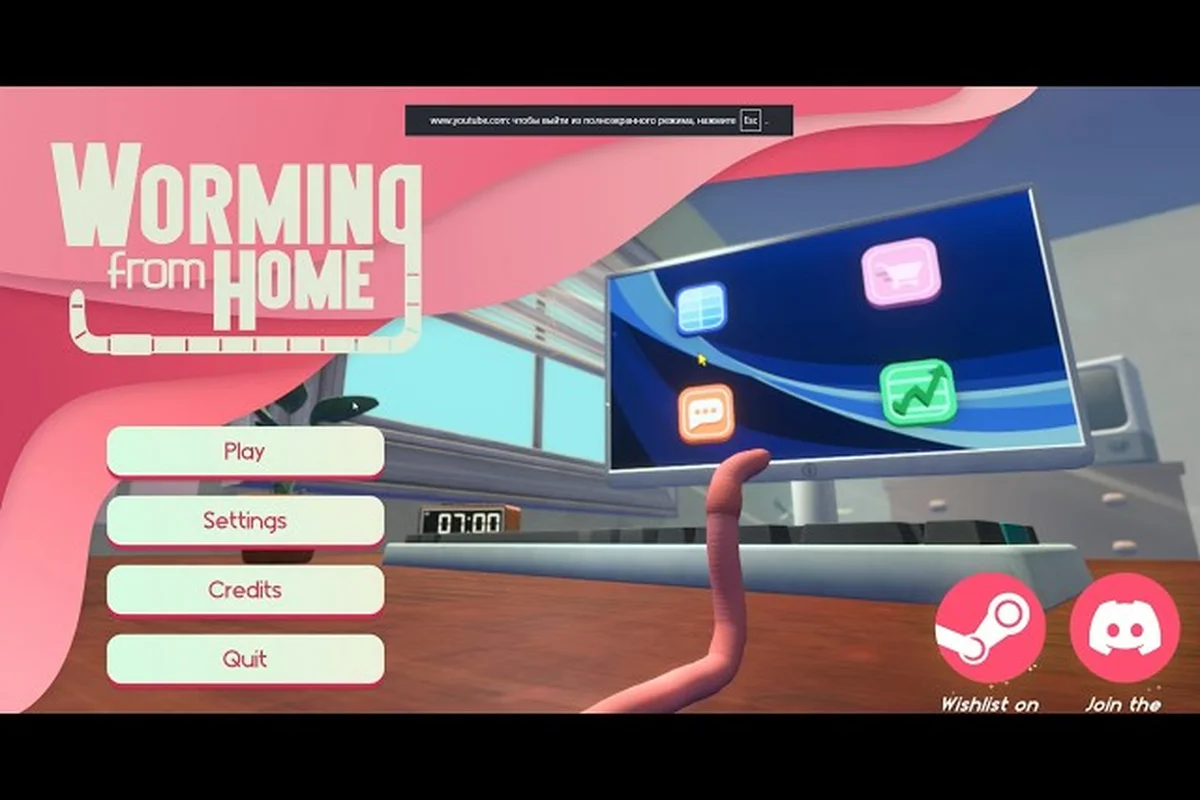
This Worming from Home walkthrough maps the full first work day, then lines up what the demo actually covers before the Steam launch build. The game drops you into a remote office as a junior financial analyst who happens to be a worm, and every spreadsheet you wriggle across feeds into your climb up the corporate ladder. Knowing where the meetings end, where the upgrade desk lives, and which secrets hide behind the keyboard tray saves you a full shift of trial and error. According to the official Steam page, the launch build ships 32 achievements and a sandbox office, and the demo build on Steam still covers the first two days for free.
Worming from Home in a Nutshell: The Premise
Worming from Home is a ragdoll-based job simulator where you play a worm trying to earn a promotion. The pitch is small but specific: throw your spineless body around a keyboard to answer messages, fill out spreadsheets, and stack enough cash to buy a corner desk. The developer duo behind it, Zach Northrop and Mason Sabharwal, framed the game as "be the Worm of Wall Street" in its Day of the Devs showcase, and the Steam launch page describes the same premise without the marketing wrapper.
Core Gameplay Loop
The worming from home gameplay loop repeats every virtual work day. You boot up the office PC, slug through an inbox, and answer messages by pressing the right keys on the desk keyboard. The ragdoll physics turn typing into a slapstick exercise where your body flails across the chair, and the game rewards you with cash for every correctly answered prompt. Between inbox rounds, you can purchase desk upgrades, invest in the stock market mini-game, and chase achievements.
The loop tightens because the game never pauses the office clock. Late answers cost you a bonus, missed emails dock your score, and the meeting timer in the corner of the screen tells you when the boss is about to call. Players report that the time pressure is the real difficulty curve, not the typing itself.
Why a Worm, Why Now
The "would you still love me if I was a worm" pitch reads like a meme, but the ragdoll core is the actual hook. The state of the art ragdoll physics referenced in the Steam description are not a flourish; they are the entire input system. Your worm has no hands, so every keypress is a full-body lunge. That constraint is what makes the worming from home review conversation focus on physics feel rather than narrative, and it is also why the Steam demo on the demo's Steam page lands so well in early coverage.
Day-One Walkthrough: Your First Spreadsheet
The Worming from Home walkthrough starts on Day 1, where the game walks you through the corporate onboarding flow. The first achievement, Welcome to Corporate Finance, unlocks the moment you log in to the office computer, and it sits at 100 percent unlock on the global Steam achievements page. That number tells you the opening sequence is not gated behind any puzzle: most players clear it in under a minute.
Morning Routine
When the shift starts, your worm spawns next to the keyboard tray and the inbox pings on the office monitor. The first task is mechanical: hit the right key for each email subject line. The game's typing prompts map to a small bank of keys (the letters A through L and a few number keys), and the prompts appear in the upper-right corner of the monitor. As reported by players, the Day 1 mail is short on purpose to teach the input timing before the volume cranks up.
A clean first-morning run in the demo build runs roughly 4 to 5 minutes if you skip every optional distraction, and it threads together five beats worth memorizing before Day 2 ramps the email volume and adds the supervisor's clipboard checks. Treat the office login as the gate that unlocks the inbox mini-game, then pace the dispenser coffee for right after your third batch so the stamina bar survives the meeting timer without forcing a desk-drawer snack restock. Getting this baseline clean is also the fastest way to unlock the Investments tab, which is where the real money multiplier for the worming from home walkthrough actually lives.
| Step | Action | Reward |
|---|---|---|
| 1 | Log in to the office PC | Welcome to Corporate Finance achievement |
| 2 | Clear the first inbox batch (5 emails) | Base salary payout |
| 3 | Buy the first cup of coffee from the desk dispenser | Small stamina boost |
| 4 | Sign the onboarding memo on the manager's desk | Unlocks the Investments tab |
| 5 | Wait out the morning meeting timer | Day 1 morning bonus |
The coffee step matters more than it looks because the stamina system drains roughly 8-10% per mistyped keystroke during inbox batches, and the desk dispenser is the only free refills source in the demo build since the vending machine on the second floor costs $12 per cup and the snack drawer refills only restore 15% in exchange for one of the two onboarding memo side rewards. Timing that first cup for right after the third email batch lets you coast through the morning meeting timer without dipping below the 30% stamina threshold that triggers a sluggish-typing debuff, and skipping it forces most runs into a costly desk-drawer snack restock before the Day 1 morning bonus even pays out.
Avoiding the Insta-Kill Floor
One of the most common worming from home secrets players discover late is that the office floor is lava. The launch build keeps the floor as a soft instakill, which means a single lunge too far off the chair ends the shift. The community compares it to a classic QWOP-style punishment, because the ragdoll will happily throw your worm off the desk if you overcommit. The advice from veteran players is to anchor one end of the worm against the keyboard tray and use the chair's backrest as a wall.
This is also where the touch keyboard controversy starts. The launch build added a touch keyboard for handheld players, but a vocal chunk of the early worming from home review thread on the Steam community reviews argues the touch keyboard is "actually worse than the small keyboard" because it removes the Ctrl toggle that the small keyboard has. The on-screen touch variant also flattens the ragdoll input into tap zones, which kills some of the slapstick joy.
Demo vs. Full Game: What Carries Over
The worming from home demo build on Steam covers roughly the first two days of the office loop, and the full launch build extends that to a six-day work week. Both builds share the same ragdoll physics core, the same inbox system, and the same starter desk. The differences live in scope and unlocks.
Side-by-Side Comparison
| Feature | Demo Build | Launch Build |
|---|---|---|
| Days available | Day 1 + Day 2 | All 6 days |
| Desk upgrades | 1 tier (starter) | 4 tiers, including the L-shaped desk |
| Wormhole mode | Locked | Unlocked after Day 4 |
| Investments tab | Read-only | Fully tradable |
| Achievements | First 4 unlocked | All 32 achievements |
| Saves | Single run | Multiple save slots |
The demo is essentially a 45-minute vertical slice, while the launch build is the full corporate ladder. If you want to know whether worming from home is it worth it for the full price, the demo answers that question by walking you through the typing rhythm and the office floor hazards without locking the rest of the content behind the purchase.
Why the Demo Resets Your Save
The demo build wipes its save file when you exit, and the launch build does not. This is not a bug. The reset is intentional because the demo is a marketing build, and Steam's demo policy requires that the demo remain a free preview rather than a permanent free tier. If you reach the Day 2 promotion screen in the demo and quit, the launch build will not recognize your progress; you start at Day 1 again with the full upgrade tree unlocked.
Players chasing the worming from home secrets in the demo should know that none of the hidden office interactions carry over. The launch build adds two secret rooms behind the manager's office that the demo's instakill floor does not let you reach.
Day-Two Walkthrough: Your First Promotion Attempt
Day 2 is where the worming from home walkthrough gets interesting, because the first promotion review hits the inbox at the end of the shift. The promotion requirement is not a hidden stat: the manager evaluates your inbox accuracy, your meeting attendance, and your net worth. Hitting all three thresholds earns you the Junior Analyst, Promoted achievement and unlocks the second desk tier.
The Promotion Formula and Its 90 Percent Gate
The launch build's promotion formula is straightforward but punishing. You need a 90 percent inbox accuracy, attendance at every meeting timer, and at least $250 in your checking account by end of shift. The 90 percent accuracy floor is the wall most players hit, because the ragdoll physics will throw keypresses into the wrong row if you lunge too hard.
| Promotion Threshold | Requirement | Where It Counts |
|---|---|---|
| Inbox accuracy | 90% or higher | End-of-shift summary |
| Meeting attendance | 100% | Meeting timer pop-ups |
| Net worth | $250+ | Bank account at shift close |
| Bonus objective | Clear the spam folder | Optional, but adds $50 |
A practical tip from community testing: bank the spam folder bonus every Day 2, because that $50 covers a coffee refill plus a starter investment. Skipping it forces you to grind the inbox for the same payout with worse accuracy.
Choosing Your First Upgrade
The upgrade menu opens after the promotion is locked in, and the worming from home upgrade priority debate starts here. The community consensus from the launch week is that the L-shaped desk is the best first buy, because the extra surface area gives your worm more room to lunge without falling off the edge. The second-best buy is the chair upgrade, which adds a backrest wall you can anchor against. The third priority is the second monitor, which displays the next inbox prompt one beat early and helps you read incoming mail.
If you are not sure how the upgrade ladder plays out across all six days, the worming from home upgrade priority guide covers the full tier list with the exact break-even points. The short version is that the L-shaped desk pays for itself by Day 3, while the chair upgrade pays for itself by Day 4.
Secrets, Bugs, and Hidden Interactions
The worming from home secrets list is short but rewarding. Most of them live behind the ragdoll physics rather than in menus, which means they are not advertised in any patch notes. The community has catalogued a handful during the launch week.
The Off-Screen Spam Folder
The most reliable early secret is the off-screen spam folder. If you wriggle your worm off the right edge of the monitor during the inbox clear, the camera pans to reveal a hidden spam tab on the right side of the desk. Clearing that spam folder once per shift adds a $50 bonus and unlocks the Eagle Eye achievement, which sits at a much lower global unlock rate than the opening achievements. The spam folder also gives you a quick out if your accuracy is slipping, because the folder's emails are easier than the regular inbox prompts.
The Coffee Glitch
A second secret is the coffee glitch. If you spam the coffee dispenser button while your worm is mid-lunge, the ragdoll will sometimes launch the coffee cup across the room and into the manager's inbox tray. When that happens, the manager's next email response nets double the payout, because the game treats the cup as a "gift." Players have reported this happening roughly once every three shifts, and the effect is consistent enough to farm but rare enough to feel earned.
The third secret is the Whole Lotta Worm achievement, which is tied to a secret mode called the Wormhole. The Wormhole opens after Day 4 in the launch build and is a separate challenge map that tests your ragdoll input on a moving platform. If you want the full breakdown of how to navigate it, the worming from home wormhole guide covers the platform timing and the rewards tied to the mode.
Mid-Game Strategy: Days 3 and 4
Day 3 in the worming from home walkthrough introduces the second promotion review and the first multi-inbox shift. The day adds a second monitor worth of email traffic, which doubles the typing volume. The new challenge is stamina, because the coffee dispenser refills slower than you burn stamina on the larger inbox. The community advice is to buy the second coffee dispenser upgrade before the second monitor, so the refill rate matches the typing load.
The Day-3 Promotion Math
Day 3 raises the accuracy floor to 92 percent and the net worth threshold to $600. The new wrinkle is the meeting prep objective, which asks you to organize the manager's calendar before the meeting timer hits zero. Missing the calendar objective docks 20 percent from your end-of-shift bonus, even if the rest of the shift was clean.
| Day | Accuracy Floor | Net Worth | New Mechanic |
|---|---|---|---|
| Day 1 | None (tutorial) | None | Inbox tutorial |
| Day 2 | 90% | $250 | Spam folder |
| Day 3 | 92% | $600 | Calendar prep |
| Day 4 | 94% | $1,000 | Stock mini-game live |
Players chasing the worming from home demo's Day 3 should know that the calendar prep objective is cut from the demo build, which means the demo's Day 3 is a soft rerun of Day 2 with harder prompts. The launch build is where the calendar prep and the stock mini-game both unlock.
The Stock Mini-Game
The investments tab opens on Day 3, but it goes live on Day 4. The mini-game is a small stock ticker with three fictional companies, and your worm can buy and sell shares between inbox rounds. The catch is that the stock prices move on a real-world timer, which means a single shift can hand you a $200 swing if you read the chart right. The community has noted that the ticker is rigged to favor long positions over short positions, so the safest play is to buy on a dip and hold until the next shift's close.
Late-Game and the Final Promotion
The late-game in worming from home gameplay is a six-day arc that ends with the Senior Analyst title and the corner office. Days 5 and 6 are the hardest because the inbox volume maxes out at three monitors' worth of email, and the meeting prep becomes a multi-step process. If you are chasing the full completion path, the worming from home day 5 walkthrough covers the second half of the corporate ladder in detail.
The Day-5 Bottleneck
Day 5 is the bottleneck day, because the accuracy floor jumps to 96 percent and the net worth threshold hits $2,000. The new mechanic is the email triage system, which asks you to sort incoming mail into three folders before answering. The triage takes about 90 seconds of pure attention, and the inbox timer does not pause while you sort. Players who skip the triage lose 30 percent of their accuracy floor for the day, which is almost always a failed promotion.
A clean Day 5 run in the Worming from Home walkthrough looks like a tight 7-minute loop where the morning inbox triage is front-loaded into a 90-second burst, then each of the three folders is drained in roughly two-minute passes between scheduled meetings. The key is treating the coffee refill at step 5 not as flavor but as a stamina buffer, because the second inbox wave hits immediately after the 10 a.m. meeting and any delay there cascades into a failed end-of-shift promotion review. Veterans consistently hit the $2,000 net worth threshold and the 96% accuracy floor in this order rather than trying to multitask folders and meetings at the same time.
| Step | Action | Time Cost |
|---|---|---|
| 1 | Sort the morning inbox into three folders | ~90 seconds |
| 2 | Clear the first folder (urgent) | ~2 minutes |
| 3 | Attend the 10 a.m. meeting | ~30 seconds |
| 4 | Clear the second folder (standard) | ~2 minutes |
| 5 | Buy a coffee refill before the second inbox wave | ~10 seconds |
| 6 | Clear the third folder (low priority) | ~2 minutes |
| 7 | End-of-shift promotion review | Auto |
The Corner Office
The corner office unlocks on Day 6, and it is the visual reward for the full climb. The office adds a second desk, a private coffee bar, and the final achievement: Welcome to the Corner Office. The achievement is currently the rarest in the game because reaching Day 6 with a clean promotion record requires every prior shift to be a near-perfect run. The global unlock rate is well below the 100 percent mark that the opening achievement sits at, which is the clearest signal that the late game punishes sloppy typing.
Is Worming from Home Worth It?
The worming from home is it worth it question comes down to how much you enjoy the ragdoll typing core. The launch build ships at $8 on Steam, which puts it in impulse-buy territory, and the demo build is free. If the typing rhythm clicks for you in the first 15 minutes, the next six hours of content are a steady escalation of the same loop with new mechanics layered on top. If the ragdoll input feels like a chore, no amount of upgrade content will fix that.
The worming from home review consensus from the launch week is positive but narrow. Players who bounced off the game cited the touch keyboard as the main pain point, while players who stuck with it praised the office simulation layering. The early worming from home gameplay videos, like the demo walkthrough from MAZAVS on YouTube, show the same slapstick rhythm that the Steam description advertises, which makes the worming from home demo a reliable way to test the core before buying.
The math on the launch build is straightforward: six days of content, 32 achievements, four desk upgrade tiers, and the Wormhole mode for the completionists. At $8, that is one of the cheaper indie launches of the season, and the free demo is a low-risk way to find out whether the worming from home walkthrough above is describing a game you will actually finish.
Frequently Asked Questions
How long is the Worming from Home demo?
The demo covers the first two in-game days and runs about 45 minutes for a first-time player. The save does not carry over to the launch build, so the demo is best treated as a free preview rather than a free trial tier.
What is the hardest achievement in Worming from Home?
The Welcome to the Corner Office achievement is the rarest because it requires a clean promotion record through all six days. Most players clear the early achievements within an hour, but the corner office achievement requires near-perfect inbox accuracy for the full work week.
Can you use a controller in Worming from Home?
The launch build supports keyboard and the on-screen touch keyboard for handheld play. The community has asked for full controller support, and the touch keyboard is the current workaround. The on-screen variant changes the input feel because it replaces the ragdoll lunge with a tap zone.
Does the stock mini-game actually pay off?
Yes, the investments tab is the fastest path to the net worth thresholds in Days 4 and 5. The ticker is rigged to favor long positions, so the safest play is to buy on a dip and hold across shifts. Players who skip the stock mini-game usually fail the Day 5 promotion because they cannot hit the $2,000 net worth floor on typing income alone.
Is Worming from Home a multiplayer game?
No, the launch build is a single-player office simulator. The co-op questions that show up in the worming from home review threads are about the demo's shared Steam family sharing, not a built-in multiplayer mode. The current roadmap does not list co-op.